EnviroLogger
Student Arduino projects usually stop at a breadboard: the circuit works, but nobody else could pick it up and use it. With a professor at UW's FizzLab who already had a working logger circuit, I took on the physical design, to build an example students could hold up against their own prototypes and see what the next step looks like.
What it does
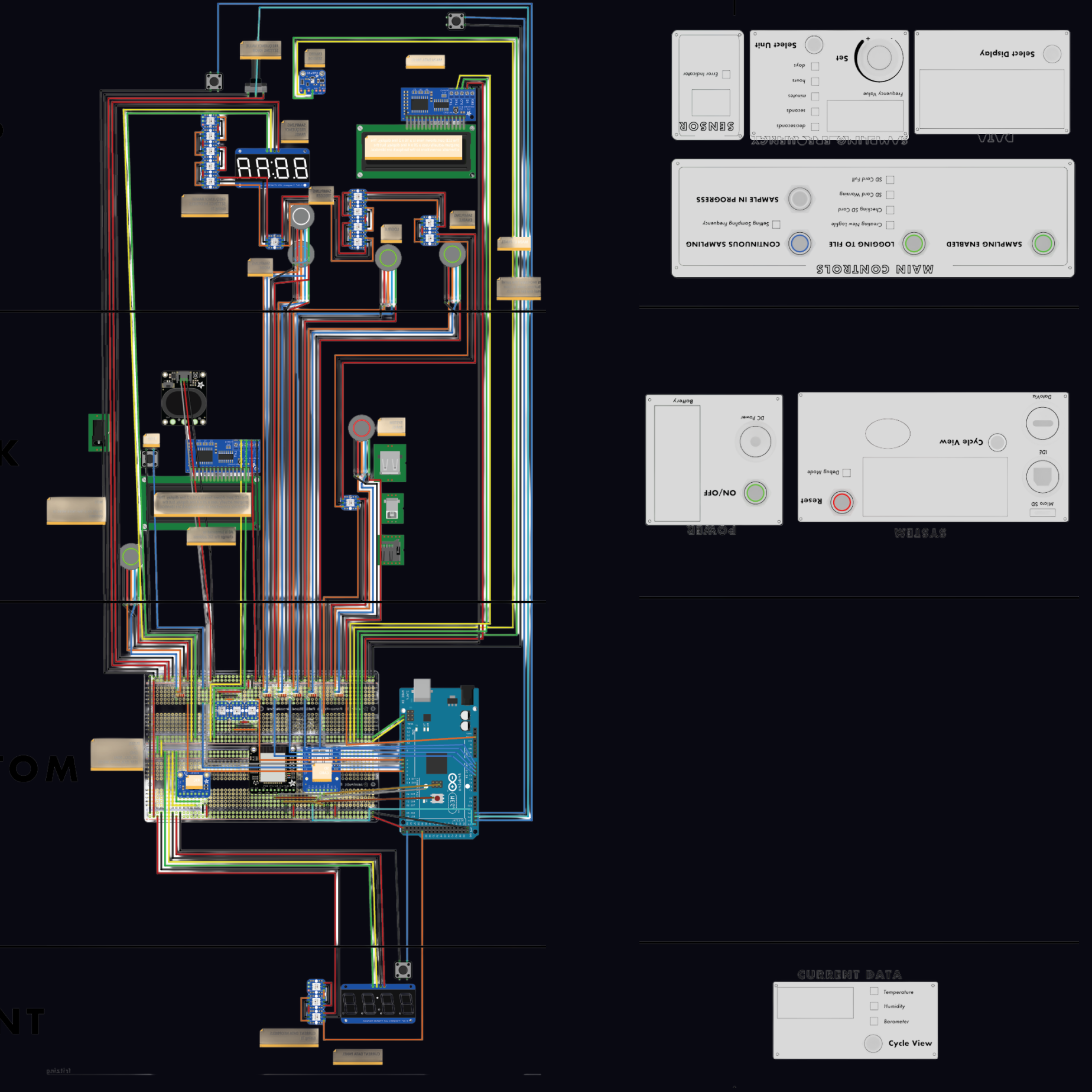
An Arduino Mega reads temperature, humidity, and barometric pressure and writes them to an SD card or sends them over Wi-Fi, on a sampling interval set with a rotary dial (seconds, minutes, or hours; continuous or manual). The lid is the interface: illuminated buttons for each mode, status LEDs for the SD card (creating a log file, warning, full), an LCD for live sensor data, and a seven-segment "Data Quickview" that cycles through the current readings.
Design decisions
- Show the circuit, don't hide it. As a teaching example, the electronics are the point. The enclosure is clear acrylic, laser cut and solvent welded, so students can see how the parts they already know connect to a finished interface.
- Labels that read cleanly and last. Each display and control is labeled by etching the text in reverse on the back of the acrylic and painting behind it. Seen from the front, the lettering sits under a smooth, clear surface: sharp against the circuit behind it, and protected from wear by handling.
- Iterate on the physical object, not just the drawing. The layout went through several rounds of cutting and assembling, adjusting the placement and grouping of controls and displays until reading a value or changing a mode worked without explanation.